
Stakeholder interviews
Understood how requesters, coordinators and service teams exchange information, make decisions and recover when information changes.
Case study: enterprise visit coordination
Captivate is an internal enterprise platform used to plan client and leadership visits across office locations. The redesign combined stakeholder walkthroughs, heuristic evaluation and workflow research to uncover why teams relied on calls, email and chat, then translated those findings into a progressive, multi-location planning and service-tracking experience.
The context
Client and leadership visits require several independent teams to coordinate spaces, technology, badging, food and refreshments, stationery and experience support. A visit may involve one office, multiple offices in the same city, or several cities. Each meeting can have different attendees, timings, rooms and service requirements.
The existing experience treated this complexity as a single, largely tabular form. Users were expected to provide information before it was available, while service providers continued coordinating through email, official chat channels and scoping calls.
The design challenge was to make an evolving visit understandable and actionable for everyone involved, while keeping the request light enough to start before every detail was known.
Triangulating the problem
No single method could explain both the interface friction and the operational breakdown behind it. The research combined behavioural evidence from stakeholders with an interface-level evaluation and an end-to-end walkthrough of the existing process.
Understood how requesters, coordinators and service teams exchange information, make decisions and recover when information changes.
Mapped the request lifecycle from initial entry to assignment, service monitoring, notifications and visit completion.
Assessed navigation, visibility of status, error prevention, content hierarchy, accessibility and consistency with brand standards.
The walkthrough exposed a gap between the system’s apparent linearity and the real operational lifecycle. The request was only the beginning; coordination continued across several people and channels.
The workflow needed to support both early planning and time-sensitive requests without pretending all information would be known at the start.
The product did not clearly distinguish response time from the minimum lead time required to deliver an individual service.
This pointed to premature data requirements rather than carelessness or lack of compliance.
Captivate lacked action-driven status updates and a reliable shared summary.
The interface review showed that visual and interaction issues reinforced the workflow problems. Users could not clearly understand where they were, what was required now, what could wait, or what would happen after submission.
No reliable request summary or service-level progress after submission.
Users returned to email and chat to ask whether support was confirmed.
A multi-location, multi-meeting visit was represented as one flat form.
Services became difficult to associate with the correct office, date or audience.
Editing time, venue, catering or attendee details was not sufficiently supported.
Changes generated manual follow-up and uncertainty about affected teams.
Errors appeared late and required information was not explained contextually.
Users supplied placeholders or discovered blockers close to submission.
Users could not see current booking information while configuring later steps.
They had to remember dates, locations and counts while selecting services.
Content hierarchy, contrast, imagery, icon use and brand patterns needed improvement.
The dense tabular presentation increased cognitive load and reduced scanability.
Findings were grouped by underlying cause rather than by screen. This prevented the redesign from becoming a collection of isolated interface fixes.
From observations to design challenges
Each problem was written in operational terms so that the design response could improve both requester usability and service-team coordination.
Users had to provide detailed guest and service information before it was known.
Separate a preliminary support request from later attendee and service details.
One form could not elegantly represent several cities, offices and meetings.
Structure information as Visit → Location → Session → Service.
All services were requested in one place despite requiring different details.
Show questions appropriate to rooms, technology, catering and access.
Meeting room, lunch and refreshments could involve different numbers of people.
Assign attendees and quantities to specific sessions and services.
Overall progress depended on manual email and chat updates.
Expose owner, status, questions and confirmation for every service request.
Updates after submission were difficult to communicate and revalidate.
Reopen only the services affected by a material change.
Reframing the product
The redesign needed to support the lifecycle before, during and after submission. Instead of splitting requester and admin work into separate tools, Captivate was framed as one shared visit record with role-specific workspaces for requesters, coordinators, service owners and admins.
Make early submission possible, then use clear deadlines and readiness indicators for information that can follow.
Keep locations, sessions, attendees and services connected so users can understand dependencies without a scoping call.
Every action should explain what was sent, who is reviewing it and whether a change affects confirmation.
The new model separates information readiness, service confirmation and actual visit status, while giving each role the actions and visibility they need from the same source of truth.
Proposed operating model
The research findings and proposed interaction model were used to show how the redesigned service could operate across requesters, Captivate, coordinators, service teams, admins and supporting systems.
This is a research-informed hypothesis—not a validated description of future operations. The frontstage journey is grounded in the walkthrough and prototype; backstage processes, ownership, integrations and measures require further validation.

The architecture connects the visible navigation to the underlying visit hierarchy and shows how actions move between requesters, coordinators, service teams, admins and supporting channels.

Research translated into interaction
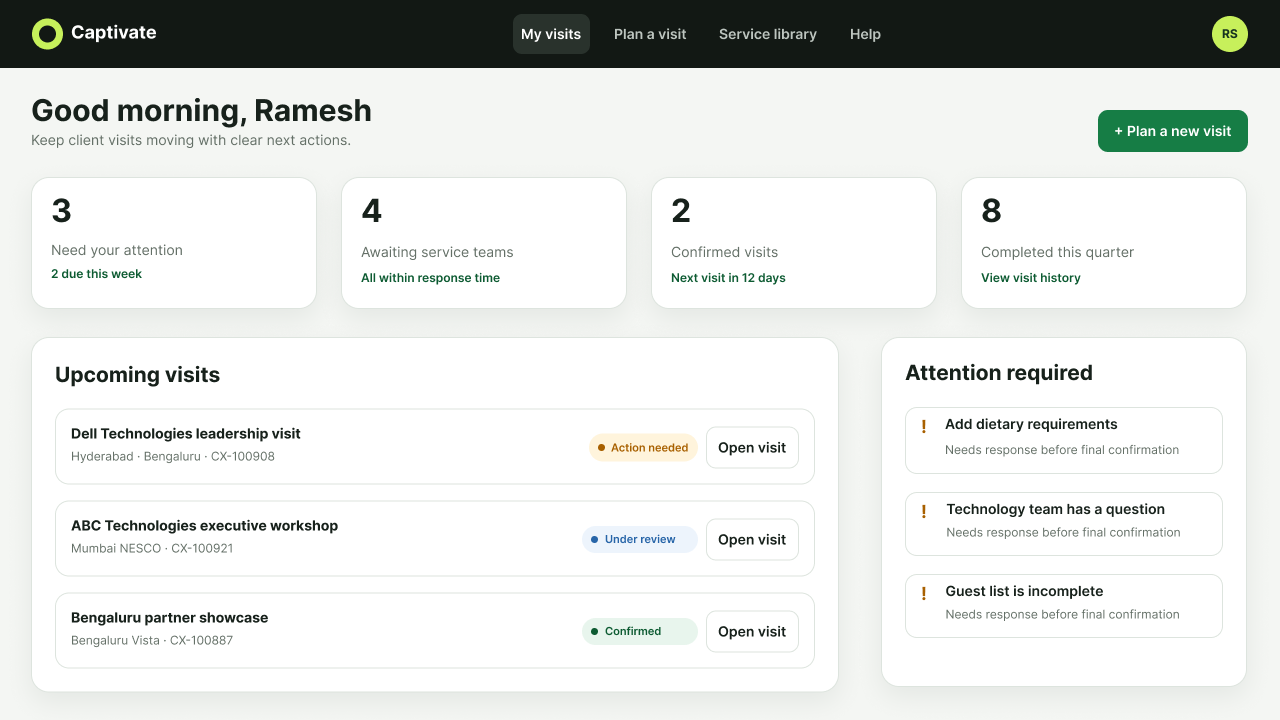
The old experience did not give requesters a useful summary after submission. The new dashboard prioritizes visits requiring attention, services awaiting teams and confirmed visits.
Status updates were fragmented across email and chat.
Show attention required, confirmation progress and the next primary action.
Reduce “What is happening with my request?” follow-ups.
Users can create a workspace with basic client, purpose, dates, locations, approximate attendance and broad support categories. The interface explicitly states that services are not yet confirmed.
Users entered dummy data when details were unavailable.
Distinguish “required now” from “can be completed later.”
Improve data quality without delaying early coordination.
A compact visit context remains visible above tabs for Overview, Attendees, Locations & sessions, Services, and Review & send. Each tab then presents its own header and action.
Manage visitor, host and local attendee details in one place.
The itinerary introduces the missing session layer beneath each office. Rooms, catering, attendees and technology can now belong to the meeting where they are actually needed.
“Multiple touchpoints” meant leadership meetings across offices and cities.
Represent every session with date, time, attendance, format and services.
Remove ambiguity that previously required a scoping call.
Selected services reveal only their relevant details. Technology asks for conferencing platform and technician support. Catering asks for quantity and dietary requirements. Visitor access is generated from the guest list.
Service teams needed different operational information.
Explain why a question is required and recommend services from visit context.
Capture micro-details accurately while keeping the interface manageable.
Service confirmation is separated from information completeness. Teams can confirm, review, request information or decline support at the service level.
Different teams approved and updated their own services.
Calculate overall progress from the status of individual services.
Create a reliable shared source of truth without hiding partial progress.
The global Service Library explains availability, lead time and required information. Help is organized around user tasks and surfaces unresolved items from the active visit before offering escalation.
Users needed inspiration and clarification without leaving the planning flow.
Connect learning content directly to visit and session actions.
Reduce broad consultations while preserving support for genuinely complex visits.
A role switcher in the prototype shows how requesters, coordinators, service owners and admins can use the same visit record while seeing different queues, actions and summaries.
Coordinators and service owners needed a reliable summary instead of monitoring requests through disconnected updates.
Keep admin work inside Captivate with role-specific dashboards for assignment, SLA risk, service queues, workload and improvement priorities.
Create one operational source of truth and reduce fragmentation between requester, admin and service-team workflows.
The table below captures the central logic of the redesign.
Information becomes available gradually.
Start coordination without inventing details.
Preliminary support request, autosave and progressive completion.
Visits span offices and leadership meetings.
Understand where and when each requirement applies.
Visit → Location → Session → Service hierarchy.
Pax varies by room, meal and activity.
Capture the correct quantity for each service.
Session assignments and service-specific attendee counts.
Scoping calls compensate for missing structured detail.
Ask precise follow-up questions asynchronously.
Conditional forms, rationale text and visit conversations.
Updates occur outside the tool.
See one reliable, shared status.
Activity history, service owners, questions and independent statuses.
Admins and service owners lacked a shared operational summary.
Coordinate work without creating a disconnected admin experience.
Role-based Captivate workspaces for requester, coordinator, service owner and admin views.
Dates, venues and catering change after submission.
Edit without restarting the entire request.
Persistent workspace and targeted service revalidation.
Clickable experience
It includes the requester journey from discovery to service confirmation, plus a role switcher that reveals coordinator, service-owner and admin workspaces inside the same Captivate shell. These views show assignment, SLA risk, service queues, dependency checks, reporting and the six improvement priorities for the next iteration.
What changed
The current outcome is a detailed interaction model and clickable prototype. Because the product has not yet been measured in production, impact is framed as design improvements and testable hypotheses rather than unverified business results.
Requesters can begin with known details and complete the visit plan as information becomes available.
The visit workspace brings service progress, responsibilities and next actions into one place across requester and admin roles.
Contextual questions and structured service details reduce the need for broad scoping conversations.